I Overengineered My Expense Tracker So I Would Not Have To
Tracking expenses has been my greatest challenge. Here is how I over-engineered my way out of it.
I have been in a situation where despite receiving a monthly salary, my average account balance never moved. Had no idea where my money was going. Not like I spend recklessly, nor like nothing. My father repeatedly told me to take out 10-15 mins daily to note down my credits and debits, but I hate this.
Tried multiple money tracker app. But there were problems. Most of these apps
- Need too many clicks just to note a transaction.
- If you want it automated, you pay money. Nah — I’m not spending money on something that isn’t critical and that I can build myself overnight.
- I could’ve built my own app, but the Apple Developer Subscription costs ~₹9000/year. That’s too much money for an app nobody but me will ever open. And even then you need thumbnails for iPhone and iPad, descriptions, a privacy policy hosted somewhere, mandatory Sign In with Apple, Apple review — for an app with exactly one user.
- Switching to Android wasn’t on the table either — my iPhone 13 is only 4 years old, and my father won’t sign off on a new one for at least 2 more years.
- Most important: everything is being used for training and targeting these days, and I really didn’t want that on my financial data too.
Wanted to build something on my own that could track my expense transactions, credits and debits across accounts. Here’s what I had in mind:
- I will not spend a single paisa on it.
- I’m not hosting anything, anywhere. It has to be running locally
- Least friction. I’m okay with 1-2 clicks, not more.
- Correctness and deduplication.
- No fancy dashboards or insights in v1. Initially, all I care about is tracking it somehow.
Sounds like I was being too hard on myself but I got there. Almost.
Let’s discuss it step by step.
Collect the Transactions.
Unless you are a developer, Shortcuts is the only collection of APIs Apple exposes.
It doesn’t expose get_all_messages_by_date, no get_messages_containing_text, no get_messages_from_sender. The only thing it has is When I get a message....
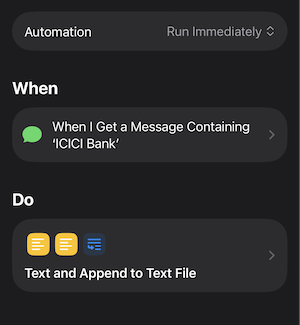
This API is part of Automations on iPhone which triggers when the respective activity happens on iPhone. E.g. When I get a message from sender X and contains text ABC then....
“When I get a message…” asks for specific sender whitelisting along with a conditions “if message contains text: ”. This was more than sufficient for my use-case.
I created an automation which triggers on messages containing texts like FEDERAL Bank, SWISS Bank 🌚.
The automation then appends the message text concatenated with the current datetime to a file stored on my iPhone along with a newline.
Done. I was somehow able to gather all my transactions. Instead of bulk fetch, it triggers realtime on every message. Even better.
Send it to my Mac
iPhone is good, but not to the level that lets me write scripts, connect to a DB, and so on. Too much to expect from a smartphone company.
Obvious choice was my Mac. Somehow need to move this to Mac.
Since my Mac would be doing the processing, I needed a workflow framework, and n8n was the obvious choice. I heard n8n’s valuation moved 10x to $2.5 billion in 7 months. That number still rattles around in my head, and honestly that’s the only reason I picked it. Kidding — n8n is genuinely easy to use (no OpenClaw harmed here), and it’s open source, so I could self-host it locally, which was one of my goals anyway.
I could trigger my n8n workflow with a webhook, but how do I fire that from my iPhone?
Obvious answer: tunneling, like ngrok, which exposes localhost to the public internet. But that’s yet another 2nd party in the loop.
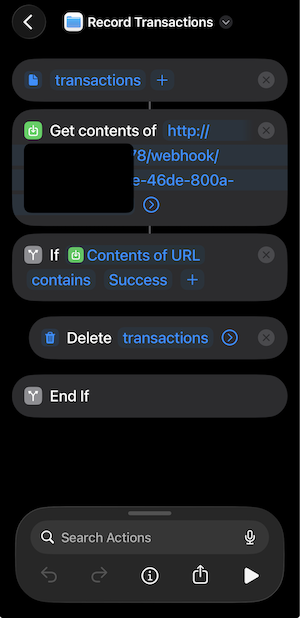
Shortcuts does provide an action to configure an API call. And that’s all I needed.
I set up a shortcut that reads transactions.txt and hits the n8n webhook. But there’s a catch: if localhost isn’t exposed to the internet, the webhook only works when my phone and Mac are on the same network. On top of that, iPhone doesn’t let you trigger a shortcut on a schedule, like a cron job. So I had to manually tap it. Then I made the executive decision that, since I was going to be tapping it myself either way, I’d just do it at night when I’m home and both devices are on the same Wi-Fi.
This is solved. I’m ready to take that one click.
Transaction Parsing
The bigger challenge: how do I reliably parse a transaction message into structured JSON? People do this with naive string matching and regex, but none of it holds up.
[!warning] Shame on you. Your workflow will not be called workflow if it doesn’t involve LLM.
Nothing’s more reliable than an LLM for this. But I’m not willing to spend even a paisa for the API key. Solution: the goated LLM my Mac has ever seen llama3:8b. Local models aren’t the most robust, but they handle simple parsing and Q&A reliably enough, and this was a perfect problem-solution match.
I just started with a system prompt: “You are the best auditor in the world…”. Had to hype llama bro.
n8n workflow
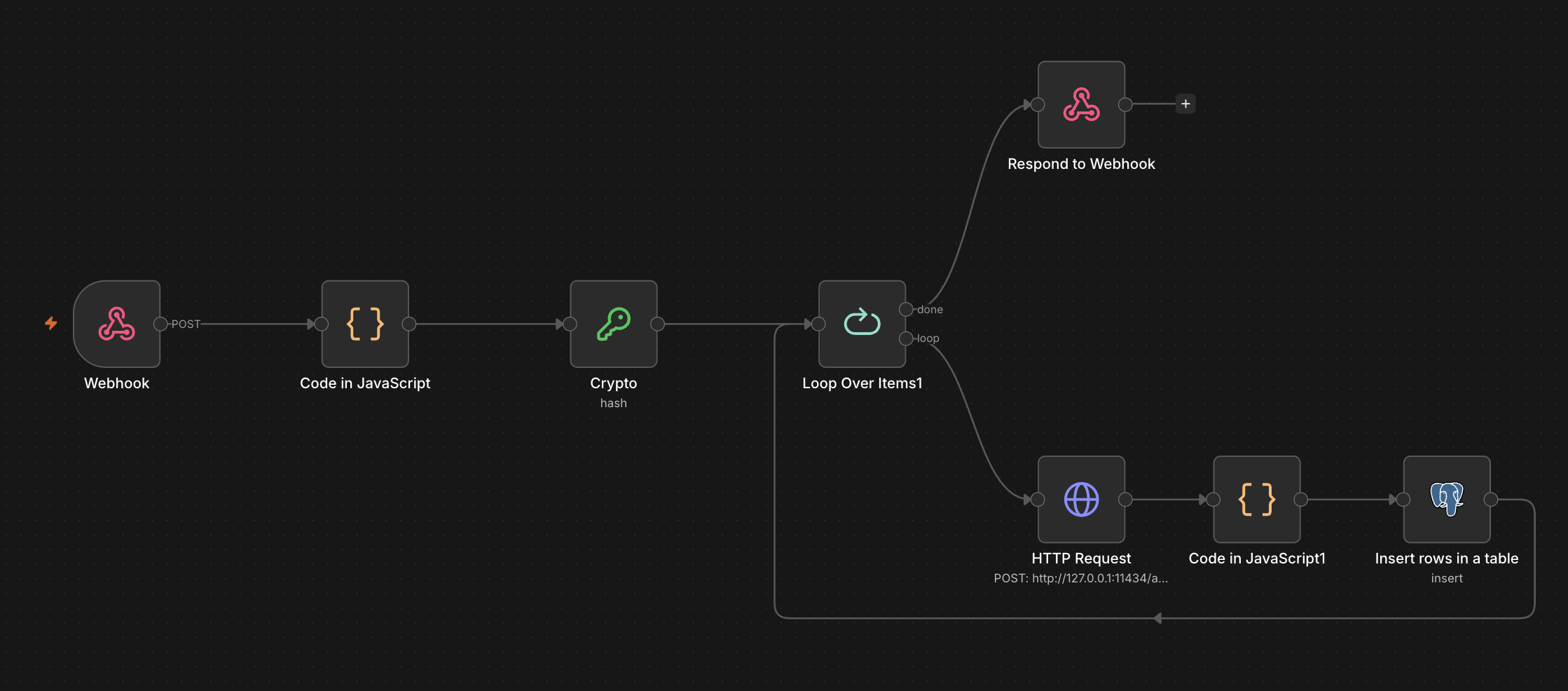
This was the simplest part. Here’s how it goes
- Read the data from webhook which has transactions data as body.
- Split by newline, compute hash(for deduplication, prevent double entries if I were to rerun due to error after partial workflow executions)
- Call local Ollama API to parse
- Persist
The Persistence
Google Sheets was the obvious choice for storing records, since I can access it anywhere, anytime. But n8n wanted me to provide OAuth credentials just to connect to Sheets. I wasn’t about to go to Cloud Console and set up OAuth at the very last step of my workflow.
So I just went with a locally hosted Postgres instance. Done.
Here’s the final thing
Finally
n8n turned out to be a genuinely great tool. It’s easy to use, a wide range of nodes, and end-to-end execution auditing with replay that saved me more than once when llama bro decided to hallucinate a field. Didn’t expect to come out of this actually recommending the workflow tool, but here I am.
What’s next
It’s only been a few days since this workflow started running. So far so good, but I’ve got a few concerns:
- I’ve put a lot of faith in local models. I’m not prepared for the day it decides to suddenly mess up the JSON parsing.
- I was wrong about being okay with “just one click” — I don’t think I’m ready to tap that shortcut every single day, and I’m fairly sure I’ll be sick of it within 2-3 weeks.
- The data just sits in Postgres with no way to access it on the go. But I won’t touch that until I’ve fixed the two problems above.
That’s it for now — probably not the last unnecessarily overengineered thing I’ll build to avoid doing something simple. Find me on Twitter/X (@LogLatency) if you’ve got thoughts, better ideas, or just want to tell me to use a spreadsheet like a normal person.