Ways to optimize your Agents
Index
- Tool Search Tool
- Multi Agents
- Skills
- Feed It Once
- Prompt Caching
- Don’t Skip the Analysis
[!tip] It’s always the best idea to first build your agents and make them work to solve your actual problem. Optimisation should be the last item in checklist.
Tool Search Tool
Traditionally, we take metadata of all the tools available and feed them as a context in every iteration of the agentic loop. Just like humans, LLMs also follows the structured thinking and output. Hence, in the given iteration, 95% of the tools may not be even required.
An agent working on a task will need data gathering tools in initial iterations and the presentation/visualisation tools in the ending iterations. Feeding visualisation tools in initial iterations is waste of precious context window.
We are heading towards long running autonomous agents which requires access to thousands of tools and feeding all of them at once is leaving less room in context window for actual data.
Introduce an tool_search tool. This tools is just like any other tools which can accepts a query or keywords and does a semantic search over all tools available, pick the matching ones and feed the new tool metadata in the next agentic loop.
By this way, the tools are loaded dynamically as and when needed; decided by the model itself.

Multi Agents
Imagine an agent responsible for triaging a production downtime incident. The workflow may involve the following steps:
- Gather relevant data and identify the affected services and
K8clusters. - Fetch and analyse logs to determine the affected APIs and user flows, and assess the impact of the incident.
- Fetch and analyse
Prometheusmetrics to identify the root cause of the issue. - Perform corrective actions to resolve the incident.
- Generate a post-mortem or RCA report.
Having a single agent perform all of these tasks can lead to significant inefficiencies.
For example, after the agent has analysed a potentially large volume of log data and moves on to metric analysis, the entire logs data may still be carried forward in subsequent agentic loops. However, having access to all log data is unlikely to provide meaningful value during metric analysis.
Additionally, each stage typically requires its own specialised instructions. Log analysis, metric analysis, remediation, and report generation all need specific system prompts and tools access.
This means the model is repeatedly being fed the data that is no longer relevant to the current task.
Passing more data than necessary between agentic loops increases costs, and consumes valuable context window capacity and with the growing context, the model has less room available for new information, which negatively impacts overall performance.
Now consider a system composed of multiple specialised agents:
- An orchestrator agent that delegates tasks to specialised agents.
- A log analysis agent with its own system prompt, log-retrieval instructions, and access to specialised
OpenSearch / ElasticSearchtools. - A metric analysis agent with access only to
Prometheustools. It requires only minimal context, such as the affected services and clusters, to perform its analysis independently.
By separating responsibilities, each agentic loop contains only the information required for its specific task.
Skills
It’s a similar idea as Tool Search Tool section above. You only feed the instructions to perform particular tasks when required. When to feed…? let the model itself decide.
Typical skill follows below format. Starting with the headers followed by the detailed instructions.
---
name: Logs Analysis
description: Analyze ingress, egress and service logs and summerize.
---
<!- - instructions - - >
In an agentic system, you may have 10s of skills. All the skill headers(name and descriptions) are fed to the model once at start of the loop. Model then reasons and loads a particular skill as and when required.
Feed It Once
Humans tends to focus more on something which is being told multiple times. Similar goes in case of LLMs to some extent.
If some text is repeated multiple time in an prompt, it forces model to focus more on it. This approach may help because of Attention bias. But, every repetition is going to cost the extra tokens.
Models have learnt billions of pages and they understands the sentence important without the repetition. Feeding the same text as Markdown tags H1, H2 or >(cite) will bring similar results with lesser no. of tokens.
[!note] Lines such as
Refer the text aboveas an input for a asked data in next iteration may be more efficient.
Prompt Caching
Understanding Prompt Caching needs understanding of the LLM fundamentals which is out of scope of this article. But Lets understand this in simplest terms.
LLMs use causal attention. Meaning from your prompt TOKEN1 TOKEN2 TOKEN3 TOKEN4 TOKEN5 — TOKEN4 cannot see TOKEN5, similarly TOKEN3 cannot see any of TOKEN4 and TOKEN5.
In an agentic system, new data in only appended to a prompt and never edited. Consider in itr1 we already computed the values for prompt This is system prompt.
Now user query is fed as This is system prompt.\nThis is user query.
Notice that
- The system prompt isn’t chaning.
- New prompt is only being added at the end of the existing prompt.
This is where the computations results of the frequently used prompt e.g. system prompts can be cached and the recomputations can be skipped in further iterations.
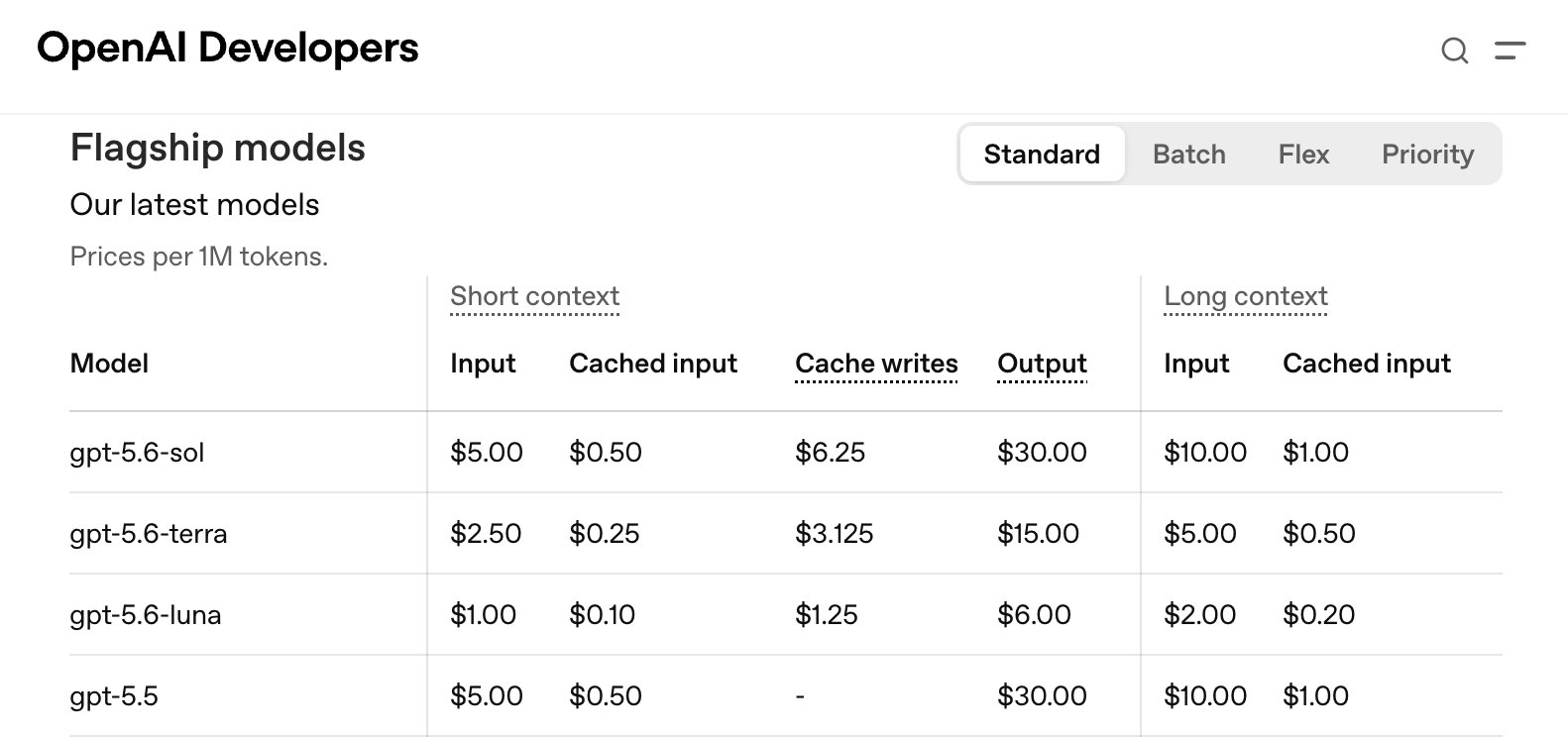
Frontier model providers offers prompt caching by enabling a feature flag. As it prevents huge re-computations, the per token costs also reduces with it. Notice the hugs difference in token input cost and cached input cost on OpenAI models.
Don’t Skip the Analysis
Analyzing the agents is as important as building them. Cost is directly proportional to the number of agentic loops. The goal is to reduce such loops without affecting overall performance.
Here, the analysis of the tools being invoked, patterns among them, the intermediate thoughts by model e.g. Looks like toolA isn't available. Let me rethink... provides insights which can be reduce to reduce the loops.
The logs analysis agent I am running showed some interesting insights.
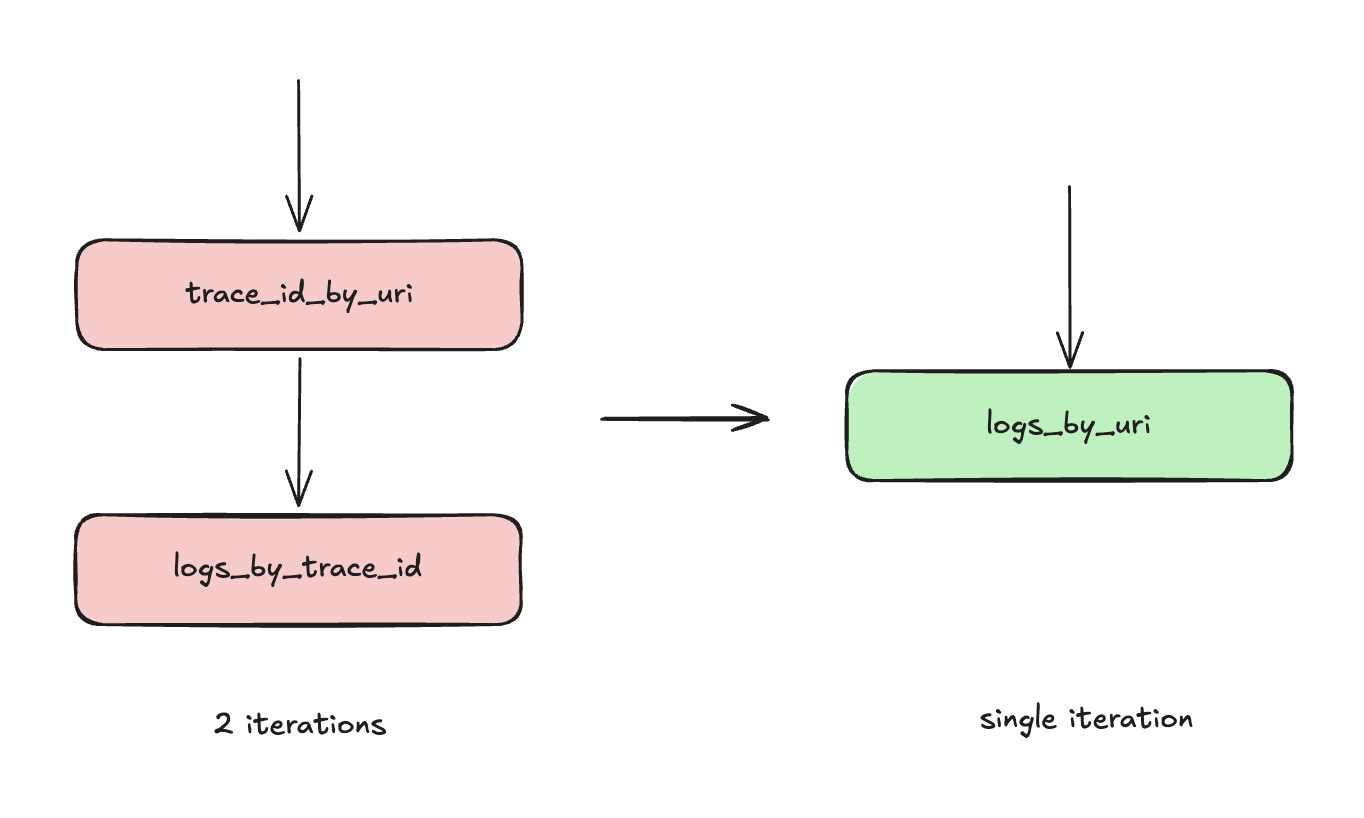
A lot of the time, it was invoking toolA which fetches the trace_id from the URI of the service whose failure the agent was debugging, from the ingress-* index. After getting the trace_id, it was then querying the logs-* index to fetch service logs, stack traces, etc., via toolB.
The pattern was that toolA was almost always followed by toolB. 2 iterations, almost every time.
Hence I exposed another tool called logs_by_uri which accepts the query and directly returns the service logs. Internally it queries both the indexes and returns the result in one shot.
Since my agent already carried significant data from logs, collapsing 2 iterations into 1 reduced token consumption by a good margin and this was just one of the patterns among other. Overall there was huge improvements in terms of cost as well as the Time-to-Loop.
Stay tuned as I’ll keep updating the blog as soon as find new ways. Feel free to reach out to me on Twitter / X for any suggestion and to solve the things collaboratively.
— LogLatency